How trips work

Three trip types

Holiday, Work, or Workation. Each gets its own icon. Trip dates update automatically when you add or change bookings.

Timeline & By Type

Switch between a chronological timeline and a grouped-by-type view with the segmented control at the top. Route summary on each trip card — e.g. SYD → SIN → SYD.

Create or import

Create a trip manually and add bookings to it, or let Honk create a trip automatically when you import a confirmation.
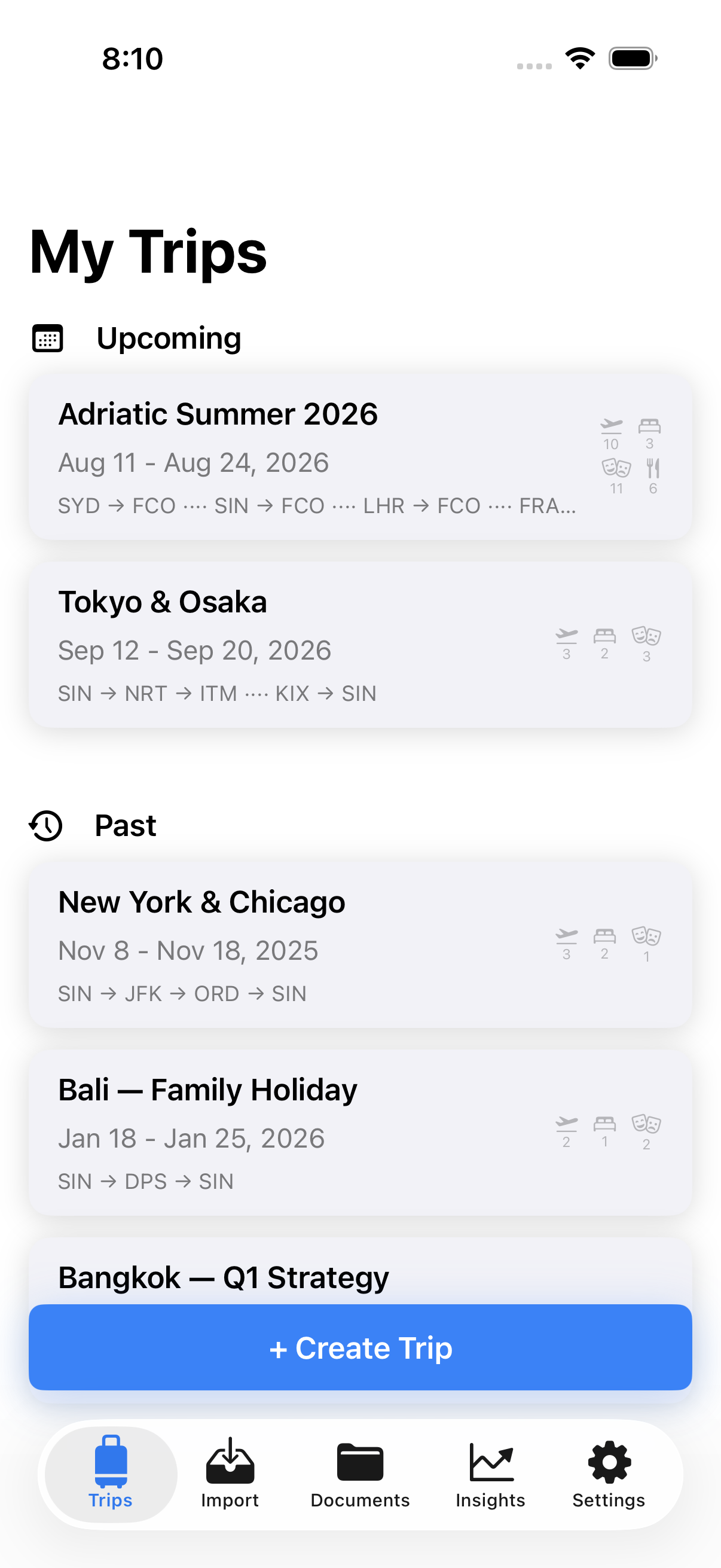
Honk trip list showing holiday and work trips

Four ways to get bookings in

Share from any app

In any app with a share sheet — a PDF viewer, a browser, a mail app — tap Share and select Honk. The confirmation is read on your device. Nothing is forwarded anywhere. Honk handles plain text, HTML, and quoted-printable encoded emails.

PDF import

Import directly from Files, iCloud Drive, or share from any PDF viewer. Parsed on-device with Apple's PDFKit — nothing sent anywhere.

Image / screenshot

Honk runs on-device OCR using Apple's Vision framework and does its best. Useful for printed confirmations or photos of screens.

Paste text

Copy confirmation text from anywhere and paste it in. Useful for web booking confirmations or anything the other methods can't reach.

Preview before saving

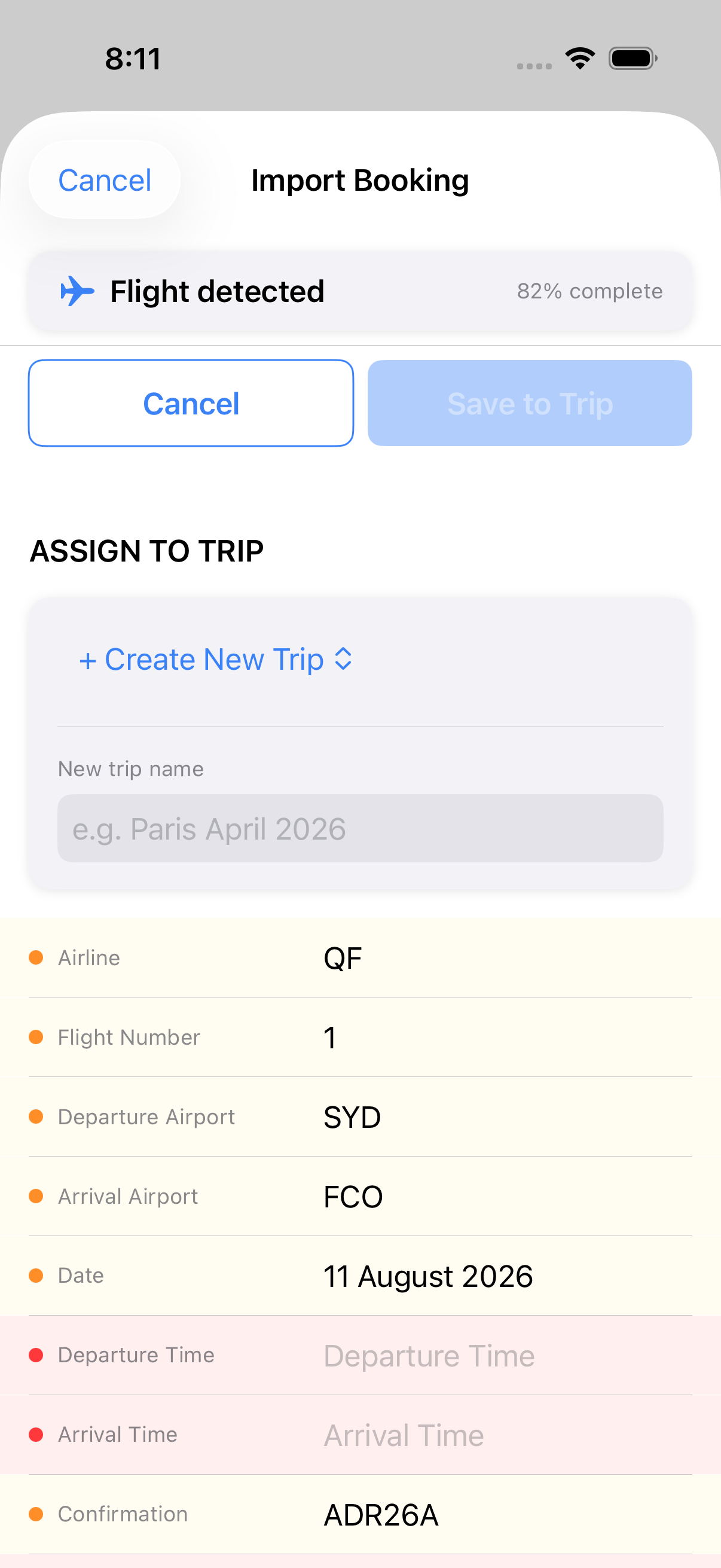
Every import opens a preview screen where you can check and edit every field before it goes in. Honk shows a completeness indicator — a score that tells you at a glance how much it found. Low score means worth a quick check. You can edit anything in the preview. Takes 30 seconds to fix a bad parse.

The importer is regex-based and pattern-matches against thousands of formats. It handles most airlines, hotel chains, and booking platforms well — but there are formats it hasn't seen. The score tells you when to double-check.

Honk import preview showing parsed flight details

Full flight detail

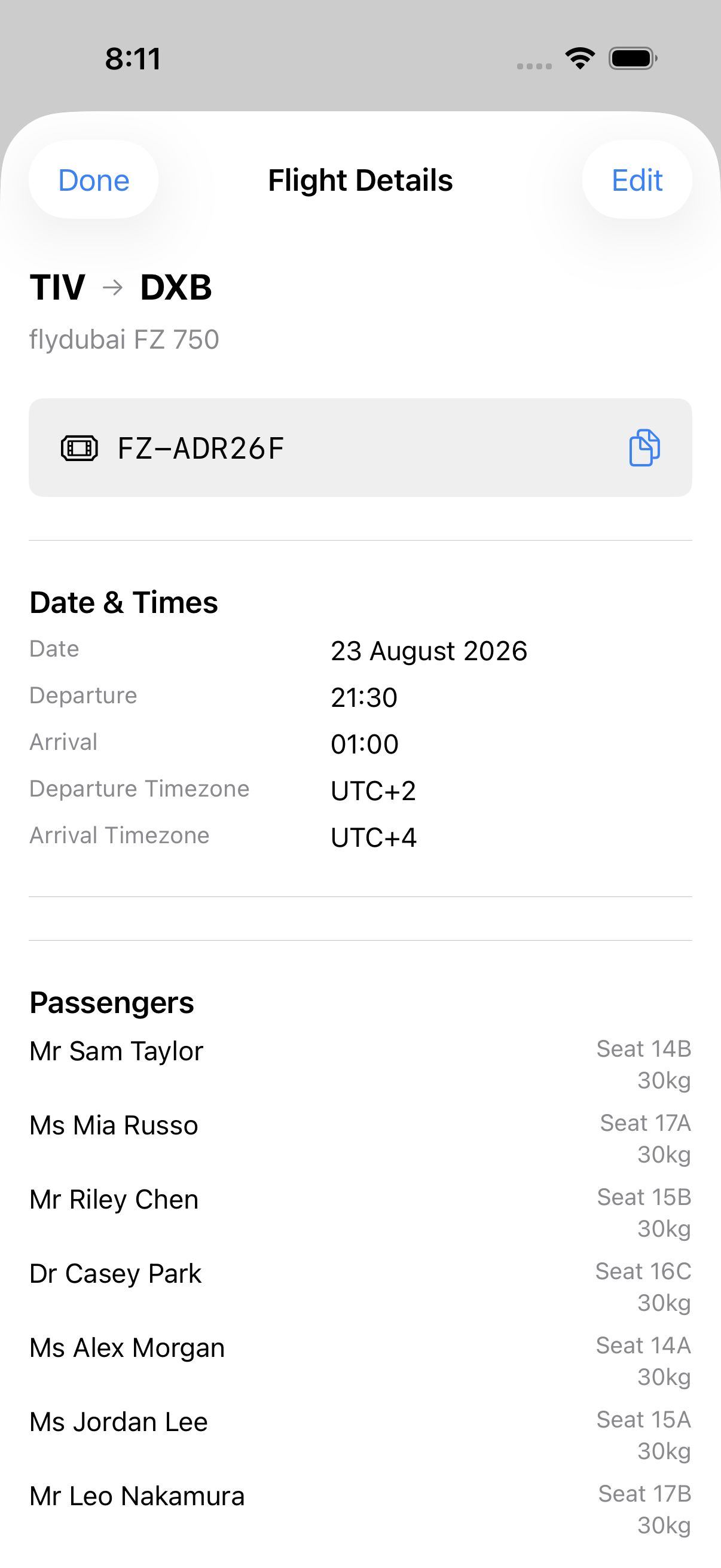
Airline, flight number, route, confirmation number. Departure and arrival times with timezone. Gate, terminal, baggage claim.

Seat number, cabin class, fare type, ticket number, meal preference, booking class (Y, J, W etc.).

Multiple passengers per flight — name, title, seat, baggage allowance, frequent flyer number and program.

Honk flight detail showing route, times, passengers

Accommodation

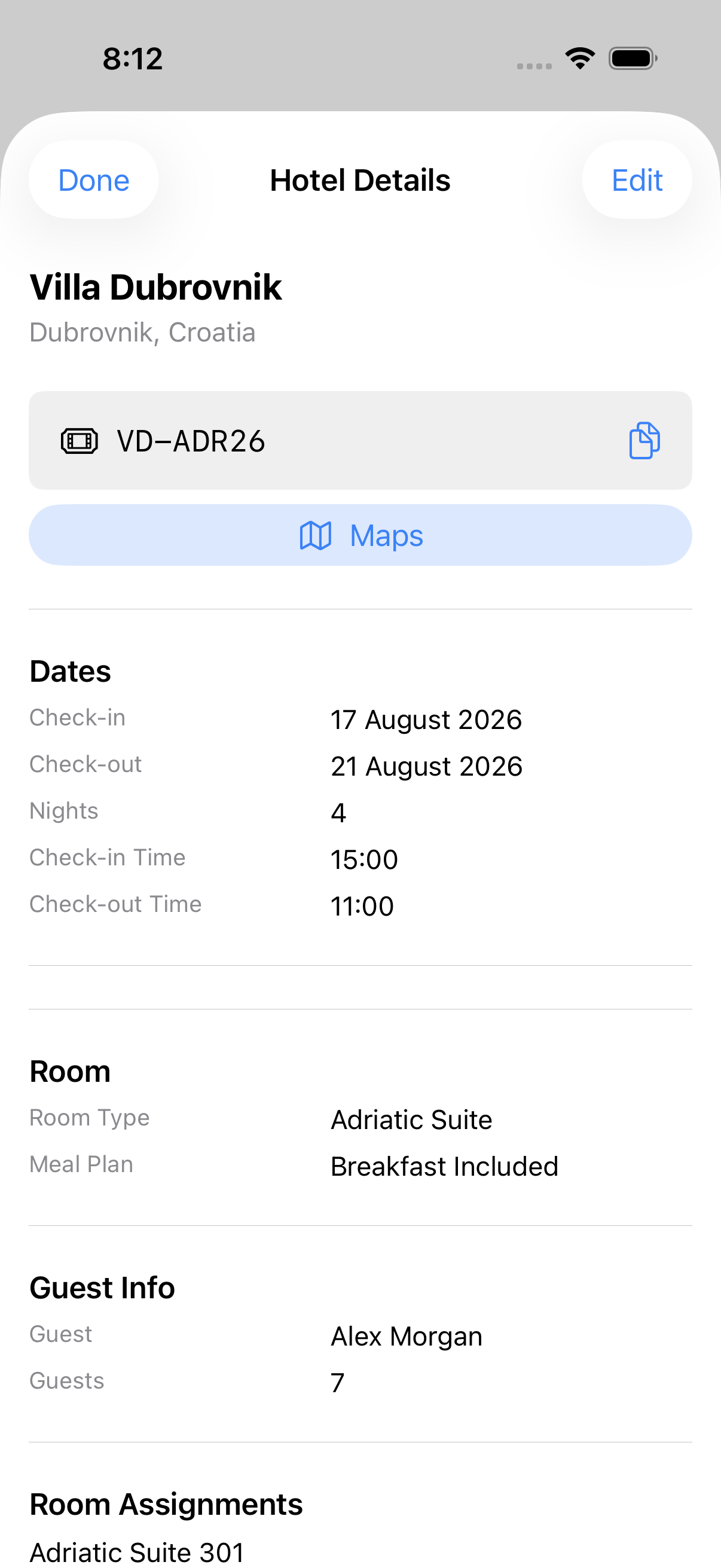
Hotel name, chain, address, check-in and check-out dates and times. Room number and type, bed type, meal plan.

Confirmation number, loyalty number. Guest details, number of guests. Price per night, total, currency.

Cancellation policy, special requests, amenities. Room assignments — assign travellers to specific rooms for group bookings.

Honk hotel detail showing room assignments and check-in dates

Reservations

Name, address, reservation date and time, party size, guest name, confirmation number.

Dietary requirements, table preference, menu type, dress code, deposit details, no-show policy. Restaurant bookings appear on the trip timeline alongside flights and hotels.

Example · Restaurant card
Attica
21 Mar · 19:30 · Melbourne
2 guests $50 deposit Smart casual

Nine categories

One flexible booking type covers everything else. Category-specific fields surface the right details for each type.

Live Events icon
Live Events
Theatre, concerts, sports. Seat section, row, number, doors time, barcode reference.
Tours icon
Tours & Sightseeing
Operator, guide language, pickup details, included/excluded.
Adventure icon
Adventure & Sports
Requirements, what to bring, weight/age/fitness limits.
Culture icon
Culture & Arts
Museums, galleries, historic sites. Entry gate, audio guide info.
Attractions icon
Attractions & Venues
Theme parks, zoos. Height restrictions, multi-day pass validity.
Transport Experiences icon
Transport & Experiences
Scenic rail, ferries, helicopters. Vehicle info, cabin class, arrival point.
Wellness icon
Wellness & Spa
Spa, yoga, retreats.
Food & Dining icon
Food & Dining
Cooking classes, food tours, tastings. Distinct from restaurant reservations.
Other icon
Other
Anything that doesn't fit above.

Every trip has a map

Always visible

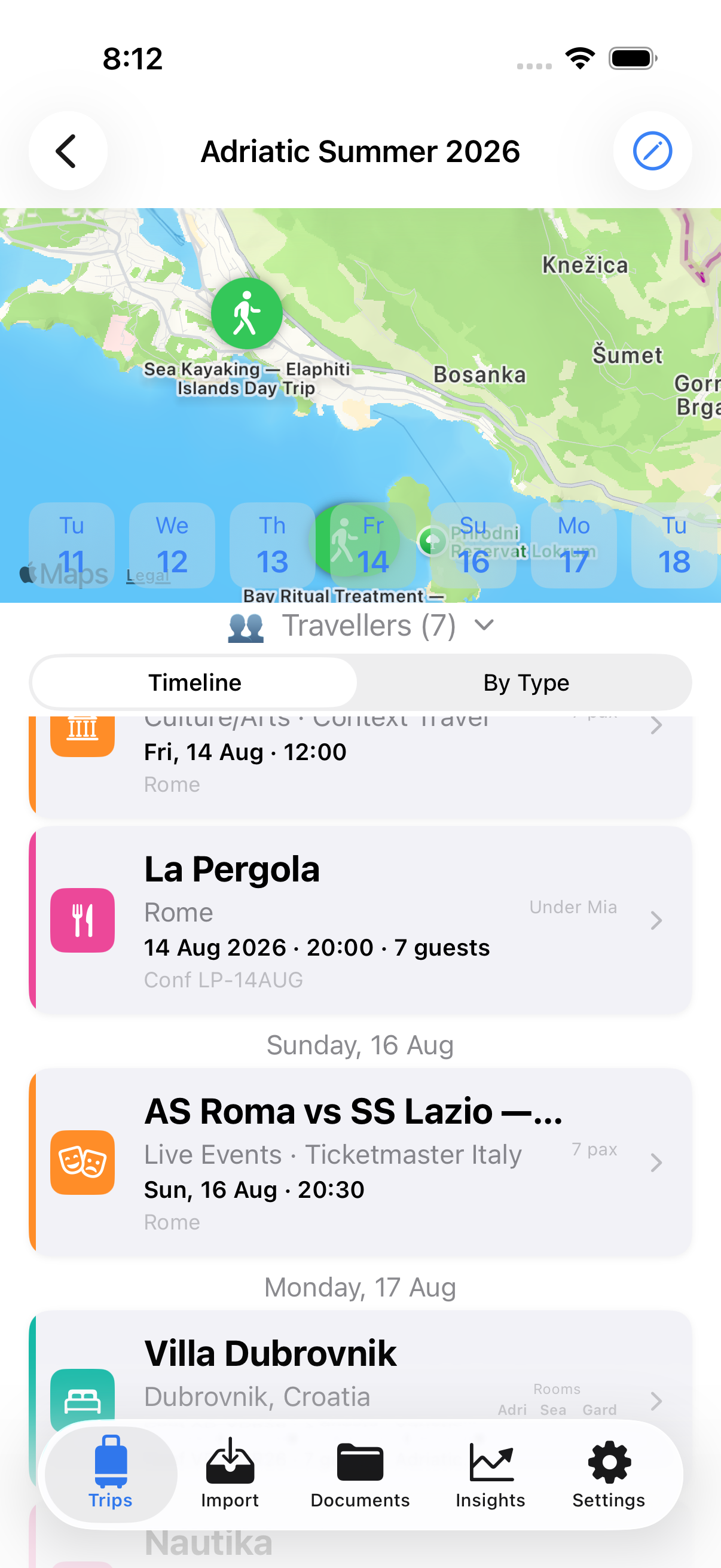
The map is there on every trip — no permission needed to see it. Location permission only needed if you want your own position shown.

Clustered pins

Pins cluster when zoomed out. Zoom in to see them individually. Tap any pin to jump to the booking detail.

Route summary

Flight airports chained in departure order on the trip card. Gaps between flights shown clearly: SYD → SIN ···· MEL → SYD.

Honk trip map showing Dubrovnik with clustered booking pins

Who's on the trip

Auto-extracted from flights

Passenger names extracted from flight booking confirmations automatically. Titles, seats, cabin class per passenger.

Manually added

Travelling with someone not on a flight booking? Add them manually. They show up in the travellers card for the whole trip.

Assign to bookings

Assign travellers to specific hotel rooms and activity attendee slots. Useful for groups with multiple rooms or different activity bookings.

The rest of the trip

Document vault Coming in v1.1

Store passport scans, visa copies, travel insurance — anything you want to keep with your trip. Face ID / Touch ID lock. Stored in your iCloud Drive, not Honk's servers.

Journal Coming in v1.1

Text notes and voice recordings attached to each trip. Private by default.

Emergency contacts

Add emergency contacts per trip — name, relationship, phone, email. Available on every plan.

Insights

Trip counts and booking totals across all your trips. Expanded stats coming in a future update.

Export & import

Export everything as a JSON file. Import it back on any of your devices. Your data, your file.

Full plan

Safety tools Coming in v1.1

Emergency numbers by country, nearest hospitals, and currency converter are coming in v1.1. When they arrive, they'll be free on every plan — safety tools are never paywalled.

What's next

🚗
Car rental
Major rental brands and local operators
Coming in v1.1
✈️
Km flown counter
Lifetime distance across all flights
Coming in v1.1
🤖
Smarter import
On-device AI (iOS 27+)
Coming in a future update
🔐
Encrypted vault
In-app encryption for document scans
Coming in v1.1

Try it free

35 days Basic access. 10 Full credits. No card required.

Download on App Store

iOS 17.6+ · iPhone, iPad, Mac